August 31, 2026
•
14
min read

What LLM Does Replit Use? The Complete Guide to Replit's AI Models
Replit uses Intelligent Model Routing instead of one fixed LLM. See current Agent modes, model options, model history, and AI integrations in 2026.

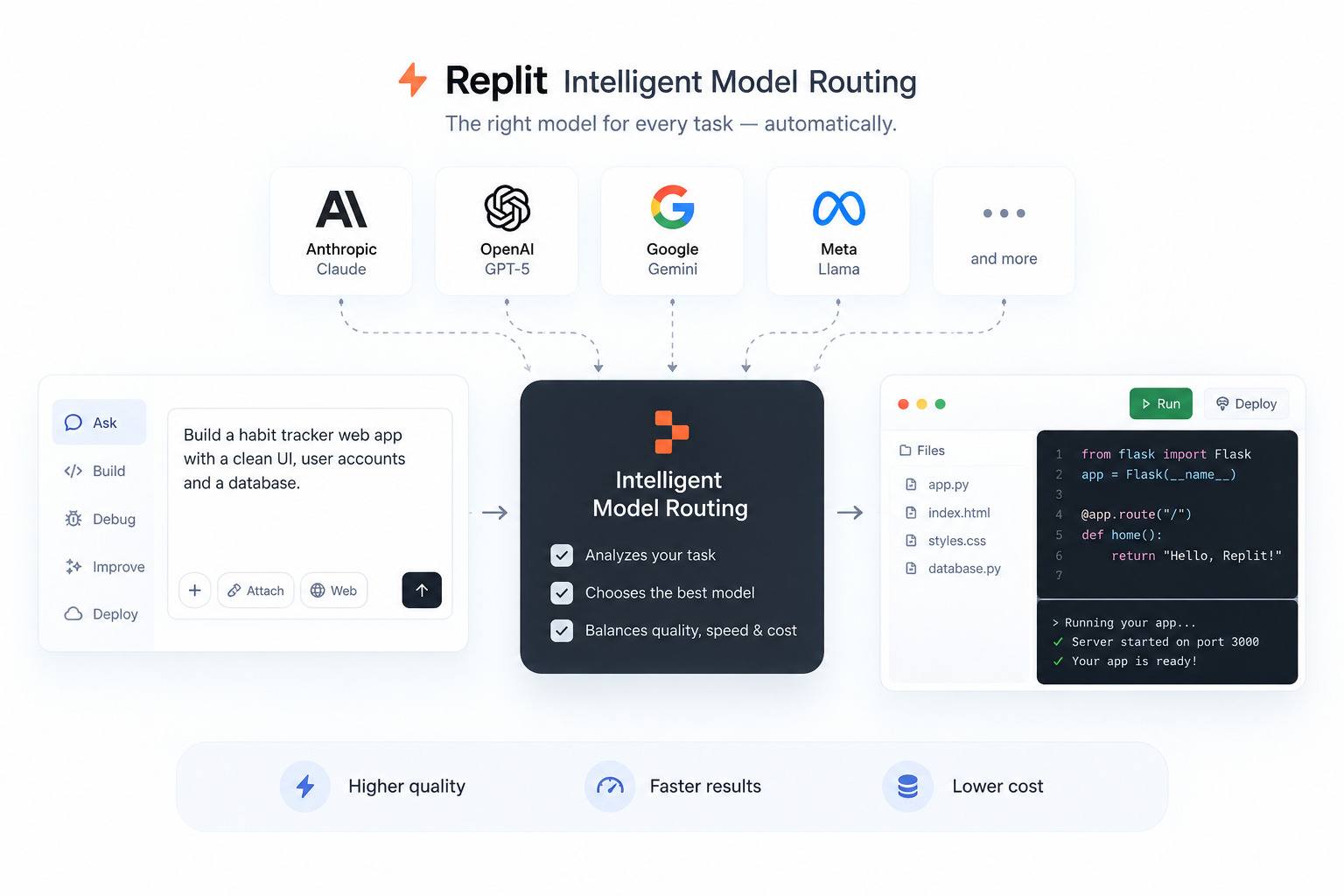
Replit does not use one fixed large language model. As of September 2026, Replit Agent can use Intelligent Model Routing to select an appropriate model for each task, balancing quality, speed, and cost. In Power and Max Modes, Replit also offers selectable models from providers including Anthropic, OpenAI, Google, and others.
That is a different answer from the one this question had a year ago, when Replit Agent was closely associated with a single Claude model. The rest of this guide explains how routing works today, what Replit’s Free, Power, and Max Modes mean, which models Replit has used over time, and how the model behind Replit Agent differs from the models you can build into your own Replit apps.
Quick Answer: What LLM Does Replit Use?
Replit Agent runs on multiple LLMs, not one. In 2026, Intelligent Model Routing can automatically choose an appropriate model for each task and switch models as the work changes. In Power and Max Modes, Core and Pro users can also select a specific model manually from Replit’s current model catalog.
Three points follow from that:
- There is no single “Replit LLM.” The model depends on the task, the mode you are in, and, on Enterprise plans, the models an administrator has approved.
- The model powering Replit Agent is separate from any model you add inside an app you build with Replit.
- Older answers that say “Replit Agent uses Claude Sonnet X” describe a historical state, not the current product.
How Does Replit Intelligent Model Routing Work?
Intelligent Model Routing is Replit’s system for picking a model per task instead of locking every request to one model. Replit announced it on August 26, 2026, and made it available to everyone on the platform.
According to Replit’s documentation, routing works like this:
- Replit considers the work you request and its complexity. A focused, well-defined request can use a lower-cost model, while complex work may need a more capable one.
- The selection is not locked for the session. Replit can select a different model as the task changes.
- The routing decision is designed to balance quality, speed, and cost rather than always choosing the strongest model.
- When you see Auto in the product, routing is active.
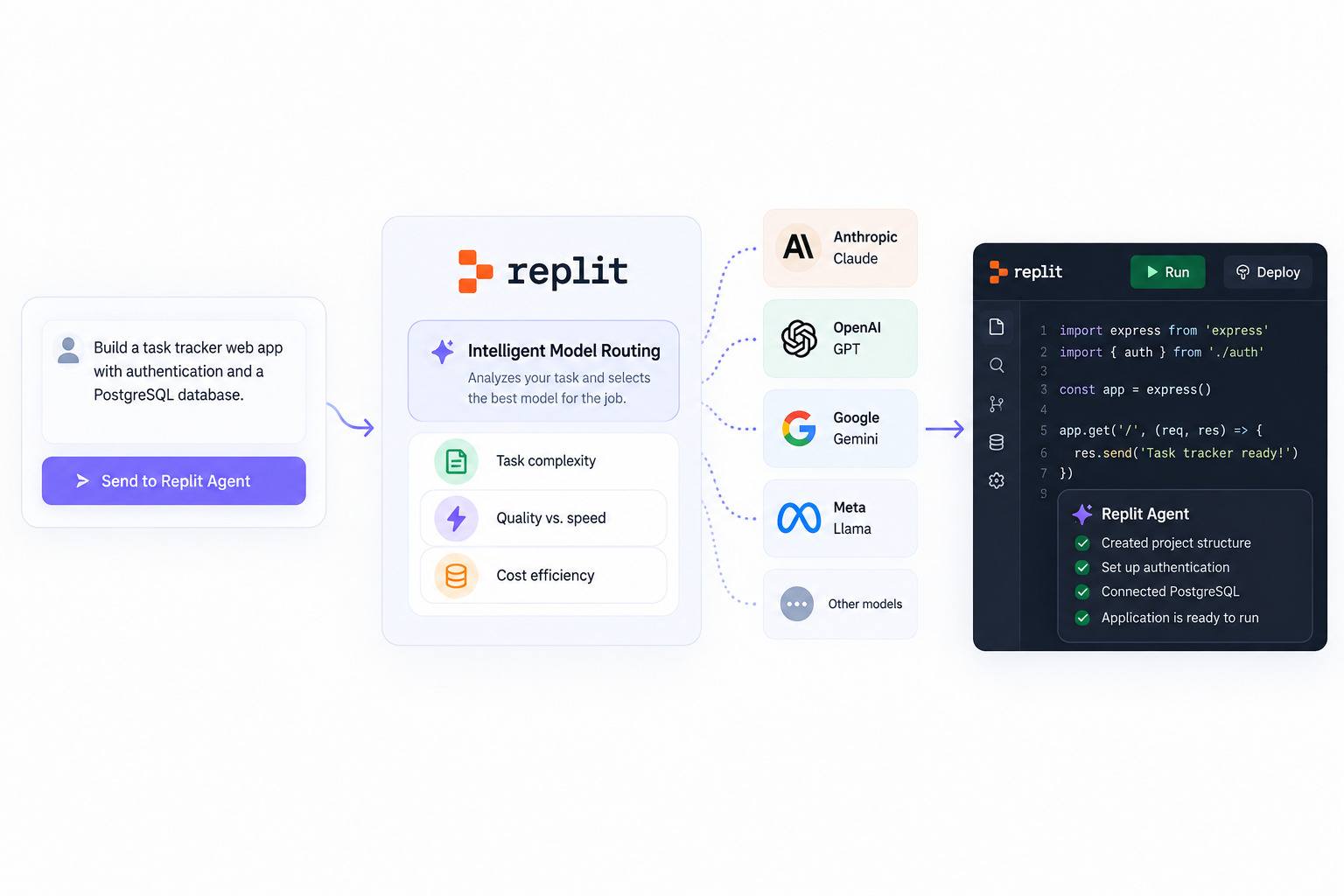
Replit says it tests models on real tasks to learn which ones perform best on different kinds of work, then applies those results in routing. In its own testing, Replit reported the same output quality at 65% lower cost than the previous version of Max Mode. That is Replit’s figure, not an independent benchmark.
Routing does not remove model choice entirely. Replit keeps two important controls:
- Manual selection. Core and Pro users can use Power or Max Mode and choose a primary model instead of Auto.
- Enterprise governance. Administrators can define an approved model set per workspace. Replit then chooses from that set.
Replit has not published the internal scoring or classification logic behind routing, so anything more specific than the documented behavior above would be speculation.
What Are Replit’s Free, Power, and Max Modes?
Replit’s current Agent modes are Free Mode, Power Mode, and Max Mode. Economy Mode is no longer available; Power Mode replaced it at the same price.
A mode is not a model. A mode sets the cost and capability range for a task. The model is the underlying LLM, selected automatically by routing or chosen manually where the plan supports it.
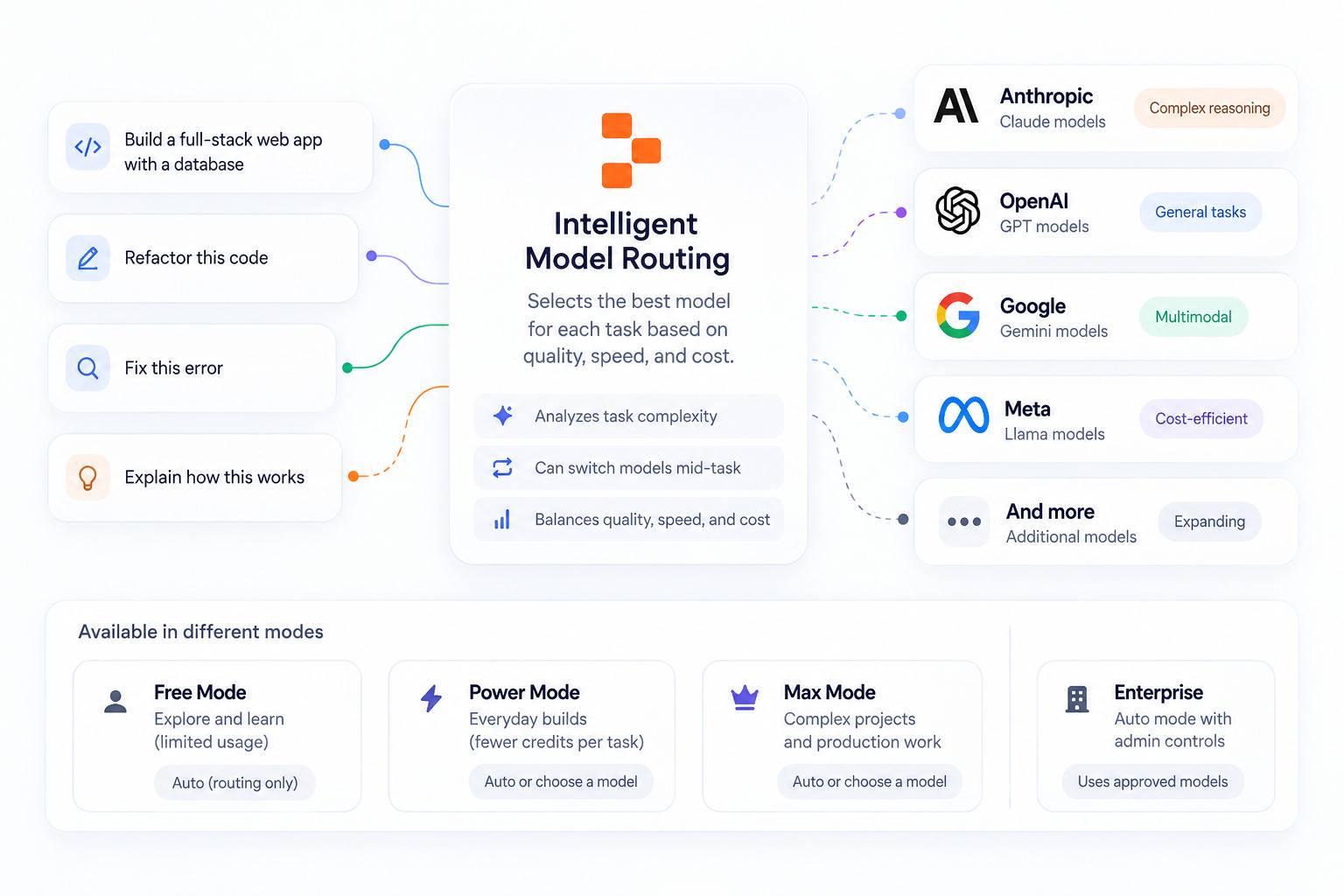
Two freshness points matter here.
First, Free Mode launched on August 18, 2026 and was described at launch as powered by OpenAI’s GPT-5.6 Luna. Intelligent Model Routing arrived eight days later, and Replit’s current docs state that Free Mode always uses routing. Free Mode should therefore not be read as one fixed OpenAI model; it is the routed, no-manual-choice tier.
Second, Enterprise workspaces use one Auto mode instead of Free Mode. Enterprise Auto can choose both the mode and an allowed model for each task, subject to administrator controls.
Routines, Replit’s scheduled background tasks, do not run in Free Mode. They run in Power or Max Mode and require a per-run budget.
What AI Models Can Replit Agent Use?
Replit publishes a catalog of models that Core and Pro users can select manually in Power Mode and Max Mode. The list in your Model selector is the source of truth for your account because availability can vary by rollout, organization settings, and authorization.
A few caveats from Replit’s own documentation:
- The list in your Model selector is the source of truth for your account. Availability varies by rollout, organization settings, and authorization.
- The Fast variants require a Pro or Enterprise plan.
- Free Mode has no selectable model list.
- This catalog is what you can choose manually. Replit does not publish which exact model Auto selects for a given task.
Alongside the primary model, Replit exposes an Effort control from Low to Max. Effort sets how much reasoning the selected model spends on a response. Replit says higher Effort can add up to roughly 2x cost on the hardest tasks while adding little or nothing on simpler ones.
Replit also has a beta Compare models option in Chat that runs one prompt across up to four models side by side. Each selected model runs a separate Agent and uses credits, so a four-model comparison costs about as much as four single runs.
Build and Design keep separate model selections. The model chosen for Agent builds does not automatically determine the model used for Design exploration.
Does Replit Use ChatGPT?
Not in the way the question usually means. ChatGPT is OpenAI’s consumer chat product, and Replit Agent is not a ChatGPT wrapper. Replit does, however, use OpenAI models in its AI ecosystem. Free Mode launched in August 2026 with OpenAI’s GPT-5.6 Luna, and current selectable model lists include GPT-5.6 variants in Power and Max Modes.
The accurate framing is:
- ChatGPT (the product): not what Replit runs on.
- OpenAI models: yes, they are available within Replit’s current AI model ecosystem.
- Replit Agent: a multi-model agentic system that can use different models rather than one fixed model from one provider.
There is a second, separate question inside this one. If you build an app on Replit and want your app to call an OpenAI model, you can do that through Replit AI Integrations. That is your application’s model choice and is separate from the model Replit Agent used while building the app.
Which AI Models Has Replit Used Over Time?
The current routed system is recent. For much of Replit Agent’s history, specific models were publicly associated with specific product features. The following is historical context, not a description of the September 2026 stack.
Replit Agent and Claude (2024–2025). Google Cloud documented Replit using Anthropic’s Claude 3.5 Sonnet on Vertex AI to power Replit Agent. Through 2025, Replit publicly adopted newer Claude-family models as they became available, including Claude 3.7 Sonnet with Agent v2 and later Claude 4-generation models. These model assignments should be treated as dated snapshots rather than current defaults.
Replit Assistant and Gemini 1.5 Flash. Google Cloud also documented Gemini 1.5 Flash as powering additional Replit Assistant features at that stage of the product, where speed and efficiency mattered for lighter tasks. Replit’s current model system is organized around Agent modes and routing rather than a separate Assistant with one fixed model.
Design Mode and Gemini 3 (late 2025). Replit introduced a separate Design Mode in 2025, but Agent 4 later replaced that standalone workflow with the Design Canvas. Current Design model selection is separate from the Build model selector, so an old Design Mode model mapping should not be treated as the current design stack.
The shift to routing (2026). Agent 4 introduced parallel task execution and the Design Canvas while evolving Replit’s existing planning workflow from plan-then-build to plan-while-building. Free Mode followed in August 2026, and Intelligent Model Routing then made automatic per-task model selection the default path for routed work.
The practical takeaway is simple: any statement that “Replit uses model X” needs a date attached.
Does Replit Have Its Own AI Models?
Yes, historically. Replit trained and open-sourced small code models in 2023, but Replit does not document them as powering the current Agent.
- replit-code-v1-3b (May 2023): a 2.7B-parameter code model trained on the Stack Dedup dataset with MosaicML’s training platform.
- replit-code-v1.5-3b (October 2023): a 3.3B-parameter causal language model focused on code completion, trained on 1 trillion tokens across 30 programming languages on 128 NVIDIA H100 GPUs, with a 32,768-token vocabulary and 4,096-token context window.
The product reason behind these models matters more than the parameter counts. Replit built them for inline code completion, a task with different constraints from agentic app-building:
- Latency. Autocomplete must respond quickly while someone types. A small specialized model is better suited to that interaction, the same constraint that shapes how AI-powered code autocomplete works in other editors.
- Cost at scale. Completion fires constantly across many sessions, so a frontier model for every keystroke would be expensive.
- Control. Training in-house gave Replit more control over the data pipeline, tokenizer, and product-specific tuning.
- Specialization. A code-completion model can be optimized for a narrower task than a general-purpose frontier model.
Replit has not announced that it trains its own frontier-scale model for the current Agent. Its current selectable Agent catalog consists of third-party models.
Is the LLM the Same as Replit Agent?
No. The LLM is one component. Replit Agent is the system around it, and that system is what turns model output into changes inside a working software project.
An agentic development tool does more than answer prompts, which is the core distinction between an AI agent and a chatbot. It plans work, reads and edits files, runs commands and tools, tests software, and iterates. The model matters, but so do the orchestration, execution environment, review steps, and recovery mechanisms around it.
Publicly documented architecture around the LLM includes:
- Orchestration. LangChain documented an earlier Replit Agent architecture built with a highly customized LangGraph workflow supporting parallel execution, tracing, and human-in-the-loop steps. Earlier descriptions referenced manager, editor, and verifier roles. Replit has not published that those exact role names describe Agent 4, so treat them as historical architecture.
- Planning. Replit introduced Plan Mode in September 2025 as a space for architecture, requirements, and task planning without modifying the codebase. Agent 4 later evolved the broader workflow from plan-then-build to plan-while-building, allowing planning and implementation work to progress without forcing one stage to finish before another starts.
- Parallel execution. Agent 4 can run multiple tasks in parallel and lets users review work before it is applied to the main project.
- Checkpoints and rollback. Replit checkpoints capture project state so changes can be reverted when necessary.
- Tool use. Agent can work with project files, commands, testing, web search, and connected services.
- Human review. Replit’s task workflows keep review and approval in the loop before important changes are applied.
When people ask what LLM Replit uses, they are usually trying to judge output quality. The better answer is to evaluate both the model and the agent system around it, because Replit can change the model without replacing the entire workflow.
What Models Can You Use Inside Apps Built With Replit?
The model that helped build your app is not necessarily the model your app uses. These are two separate layers:
- Layer A: the Agent’s model. Chosen by Intelligent Model Routing or by you in Power/Max Mode. It helps build and edit the project.
- Layer B: your app’s model. Chosen by you, integrated into your application, and called at runtime when users interact with the app.
For Layer B, Replit offers Replit AI Integrations, a managed way to call third-party models without separately managing provider credentials. Current Replit documentation supports:
- OpenAI: models for text generation, reasoning, image generation, audio transcription, and audio output.
- Anthropic: Claude models for reasoning, writing, and coding.
- Google (Gemini): multimodal models for text generation and reasoning, including image generation.
- OpenRouter: access to 200+ models from providers such as Meta, Mistral, DeepSeek, Qwen, Microsoft, Nvidia, Amazon, and others.
Replit AI Integrations supports text, image, and audio output. Audio capabilities include transcription and audio generation through supported OpenAI models. Video output is not currently supported through Replit-managed AI Integrations.
Replit manages credentials and bills managed AI usage at the provider’s public API price against Replit credits. Replit AI Integrations requires a paid plan; Starter users can still build AI apps by supplying their own API key.
Typical cases where an app uses its own model, independent of the Agent, include:
- a customer-facing chatbot;
- a RAG assistant over your documents;
- image understanding or generation;
- structured data extraction;
- classification or moderation;
- content generation.
In each case, you choose the model based on your application’s runtime needs, not on what Replit Agent used while building it.
Why Does Replit Use Multiple AI Models?
Replit’s current routing design reflects a few practical reasons the company has stated publicly:
- The best model changes. Replit says the best model for a task can change week to week, project to project, and task to task.
- Cost versus capability. Different tasks need different levels of reasoning and performance, so always using the most expensive model is inefficient.
- Removing a decision from the user. Routing reduces the need for users to compare model catalogs before they can start building.
- Keeping control for people who want it. Core and Pro users can still select models manually in Power and Max Modes.
- Enterprise governance. Enterprise administrators can restrict the approved model set available inside a workspace, and routing operates within those controls.
Frequently Asked Questions
Does Replit Use Claude?
Yes, among other providers. Claude models appear in Replit’s current manual model catalog, and Claude was central to earlier versions of Replit Agent. Claude should not be treated as the one fixed model behind Replit Agent today.
Does Replit Use ChatGPT?
Not as a wrapper. Replit Agent is not powered by the ChatGPT product, but Replit does use OpenAI models within its current AI ecosystem. GPT-5.6 variants appear in Replit’s current model options, while Intelligent Model Routing lets Replit Agent use different models instead of relying on one fixed ChatGPT model.
Can You Choose Which AI Model Replit Uses?
On Core and Pro plans, yes, when using Power Mode or Max Mode. You can use Auto for Intelligent Model Routing or choose an available primary model manually. Free Mode always uses routing and does not provide manual model selection. Enterprise users work within the model controls their administrators configure.
Does Replit Have Its Own LLM?
Replit trained and open-sourced replit-code-v1-3b and replit-code-v1.5-3b in 2023 for code completion. Replit does not currently document either as the model behind Replit Agent, and the current selectable Agent catalog consists of third-party models.
What Model Does Replit Agent Use in Free Mode?
Free Mode always uses Intelligent Model Routing, so Replit does not commit it to one fixed selectable model. Free Mode launched in August 2026 with OpenAI’s GPT-5.6 Luna, but current documentation defines Free Mode by routing rather than a permanent one-model mapping.
Can a Replit App Use a Different AI Model Than Replit Agent?
Yes. The Agent’s model and your application’s runtime model are independent. Through Replit AI Integrations, paid-plan apps can use models from OpenAI, Anthropic, Google, or OpenRouter regardless of which model Agent used to build the project. You can also provide your own API keys.
Does Replit Agent Cost More When It Uses a More Capable Model?
It can. Power Mode is optimized for cost, while Max Mode uses more capable models for harder work. Higher Effort settings can add up to roughly 2x cost on the toughest tasks, according to Replit’s current model-selector documentation. Actual usage depends on the task, mode, model, and plan.
Conclusion
The question “what LLM does Replit use” no longer has a one-word answer. Replit Agent uses a multi-model system with Intelligent Model Routing, manual model selection in Power and Max Modes, and Enterprise controls over approved models. The model used inside an app you build with Replit is a separate decision again.
If you evaluate Replit on model quality, evaluate the system rather than one model name: how routing behaves on your tasks, when higher-capability modes improve results, how much model control you need, and how the Agent’s orchestration and review workflow fits your project. If you are weighing Replit against other tools, it helps to see how Replit compares to Lovable and how today’s AI code editors approach model choice. Model names will change. The system around them is what you are actually choosing.
Build Smarter With RapidDev
Understanding which models a platform uses is one input into a build decision; turning that into a production application is another. RapidDev builds custom AI-powered software and helps teams pick and integrate the right models for their own apps. If you want to talk it through, get in touch with RapidDev.